Beautiful Screen Recordings in Minutes
macOS screen recorder with automatic zoom and smooth animations for product demos, tutorials, and social media videos.
Helping people create beautiful screen recordings at
Made with Lens
Thousands of people use Lens to record product demos, courses, tutorials, and social media posts.
Engaging screen recordings.
Created in minutes.
Lens is an opinionated screen recorder that makes
your videos look beautiful.
It automatically zooms in on your cursor, increases the cursor size and
smooths its movements.
Automatic zoom for engaging screen recordings
Make your demos and tutorials easier to follow while grabbing more attention. Especially on smaller screens.
Professional animations by default
Lens is a video editor that works automatically. Effects that would take hours of manual work are created instantly.
Add your style and branding
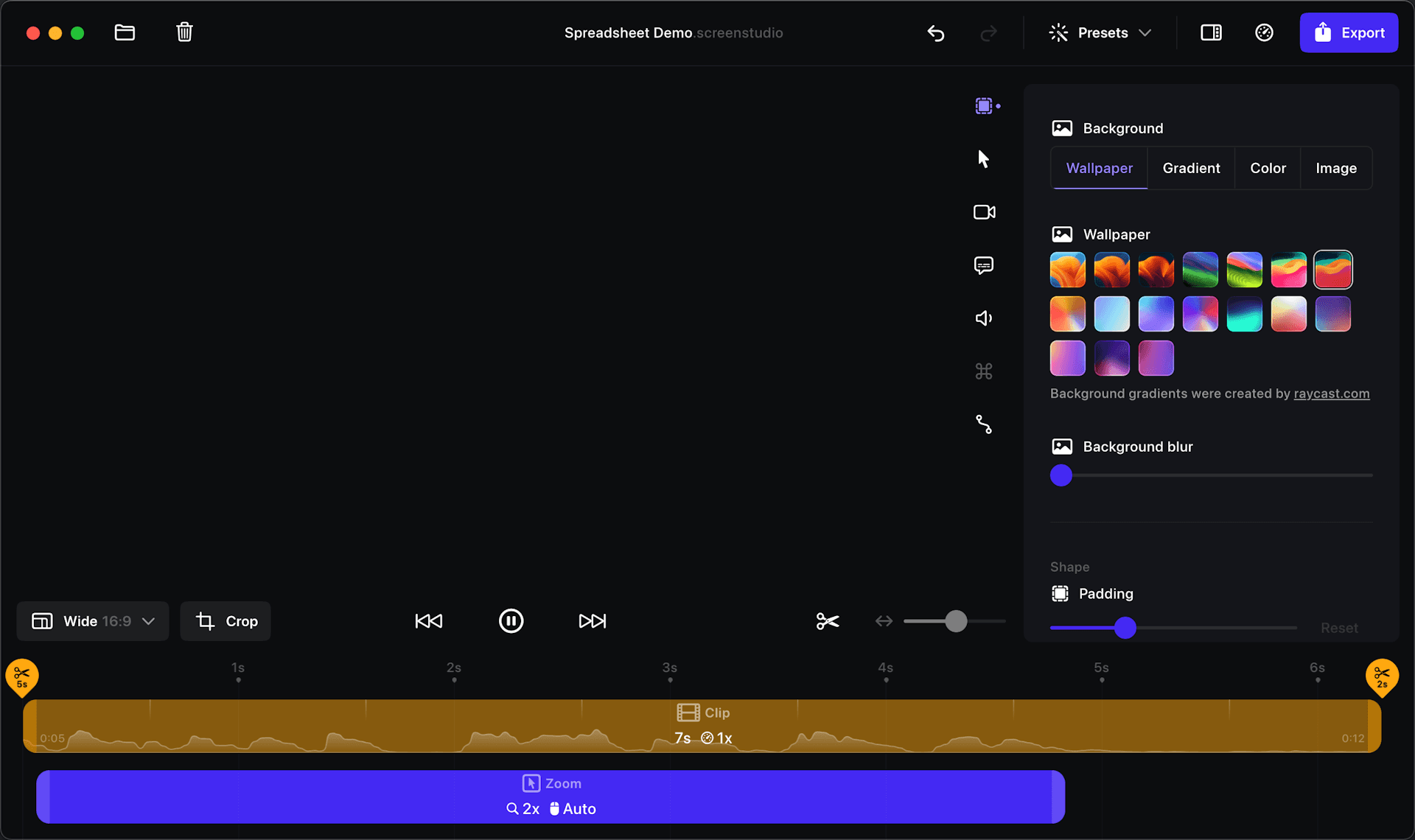
Whatever you record, it will match your brand. Change the background, outer spacing, shadow, inset, and more.
Background and spacing
Easily change the background or spacing around your video.
Horizontal and vertical output
With one click, change the desired output of your video. All animations will be automatically adjusted.
Shadow and inset
To adjust subtle details, change the shadow or inset of your video.
Cut & Speed up
Easily trim, cut, or speed up parts of your recording.
Easy screen recording
Simple, but powerful. Lens can record webcam, microphone,
system audio, or any iOS device.
Record webcam, microphone, and system audio
Lens makes it easy to create full-featured courses, tutorials, team updates, and demos.
Export & Share. Smooth and easy.
Optimal exports settings baked in. Decide where to publish your video, and Lens will adjust all technical settings for you.
Shareable links
Quickly share your video with anyone by generating a link.

Export presets
Export for the web, social media, or further editing in another video editor. Optimal settings are automatically selected.
Video and GIF exports
Export your videos in up to 4K 60fps or highly optimized GIFs.

Copy to clipboard
Copy your video to the clipboard and paste it into any other app for quick sharing. You can paste it on social media or in a chat.

There is more
Lens is packed with useful features while we try to make it easy to use and beautiful.
Designed for macOS
Built and designed to be fast, reliable, and easy to use.



Meet Lens users
Lens empowers thousands of people to record beautiful videos and demos of their products and services.
Lens from @pie6k I think is the best tool I've picked up for my Mac in YEARS Lens
I'm seeing more and more product videos (even by Fortune 500) now being created in @lens. Being a user myself, and with 5+ years of content marketing background, this is definitely one of the best screen-recording apps that I have used. Great work @pie6k
Never bought something so fast - Lens screen recordings look amaazing! 🌟✨
Elevating my screen recording game with Lens! I have been using it to capture laptop views and decided to try out the mobile feature, and I'm blown away! The perfect way to share my screen magic with clients!🚀 Thanks @pie6k for this fantastic tool!
@pie6k I've been using Lens for almost everything. This is one of the videos I shared recently and based on "product design work in progress" ▅ ▇ ▂ ▃ ▁
The only working method to boost your launch on socials is to use Lens I've never got so many link clicks before. @pie6k you're making magic.
Lots of folks are asking about the recording tool that I use. It's the @lens app by @pie6k, and it has easily become an essential part of my routine work. It wouldn't be possible for me to share my @framer work without the help of this app. I highly recommend it.
@databas3_io Lens from @pie6k —easily one of my favorite mac apps!
Lens by @pie6k is such a phenomenal tool! Wow, just wow!
One software I f#cking love is @lens by @pie6k Legitimately can't live without it. If you're building something and want to film amazing video demos in minutes, you need to check it out. Link: lens.lemonsqueezy.com... @_buildspace @_nightsweekends #buildinpublic
@pie6k One of the best products I have ever used.
I just purchased Lens by @pie6k and hands down one of the best screen recorders, I love the real indie hackers building products with so much value and love for design.
@pie6k This is awesome, charge double plz! This is far more useful than Camtasia & other screen recorders.
@pie6k Best thing ever, saved me half a day!
@pie6k just downloaded #lens and already sort of love it! Def. using it for screen recordings of @flutterflow so awesome!
Was able to create this video in a half day with Typeframes from @_justlilian and Lens from @pie6k. Absolutely killer combo 🔥
If you are one of the people quoted above and would like to have your testimonial removed, please get in touch and I will remove it instantly.
One tool for your video-making needs
Level up your tutorials, product demos, and collaboration with Lens.
Lens
All Lens features included.
Per month billed monthly. Switch to yearly anytime.
Lens
All Lens features included.
Per month billed yearly.
Questions & Answers
If you have any other questions, please get in touch